Ella Zhou
Contact

Ella Zhou
Contact
Alibaba
AI User Journey Analysis Tool
B2B Internal Tool / AI Product Design / End-To-End prototyping
2025.05 - 2025.08
An AI user journey analysis tool, helping product designers to improve journey generation accuracy to 85% and reducing journey creation and analysis time by 70%
company

Taobao Flash Sale
Taobao Flash Sale supports Alibaba’s key local services ecosystem. It provides instant food delivery and last-mile logistics within cities, serving millions of users every day.

Team
AI Design Team (Under Logistics System Design Team)
1 Sn. Design Team Lead, 2 Technical Consultants, Ella
Importance of User Journey

On average, Alibaba’s designers spend 2 - 4 weeks creating journey maps to reconstruct behavior paths and identify issues. Despite the significant time and resources required, user flow remains one of the most critical steps before decision-making and design output.
Problem
At Alibaba, the effectiveness of user flows is hindered by inefficient on-site user behavior documentation and inconsistent and time-consuming practices, making it difficult for designers to generate quick insights to guide design decisions.
Solution

Create an end-to-end AI user journey analysis tool that:

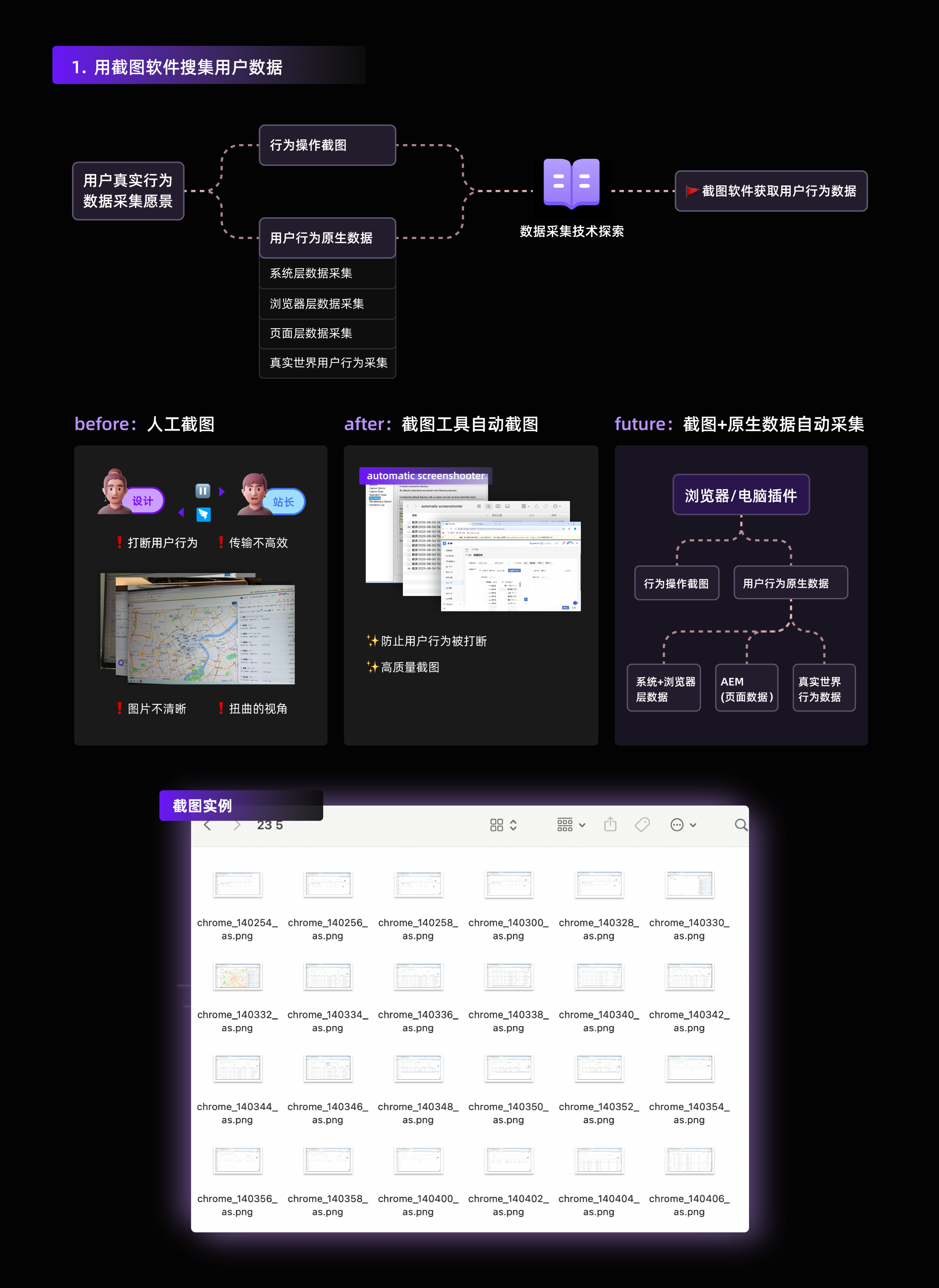
Automate and standardize user behavior data collection
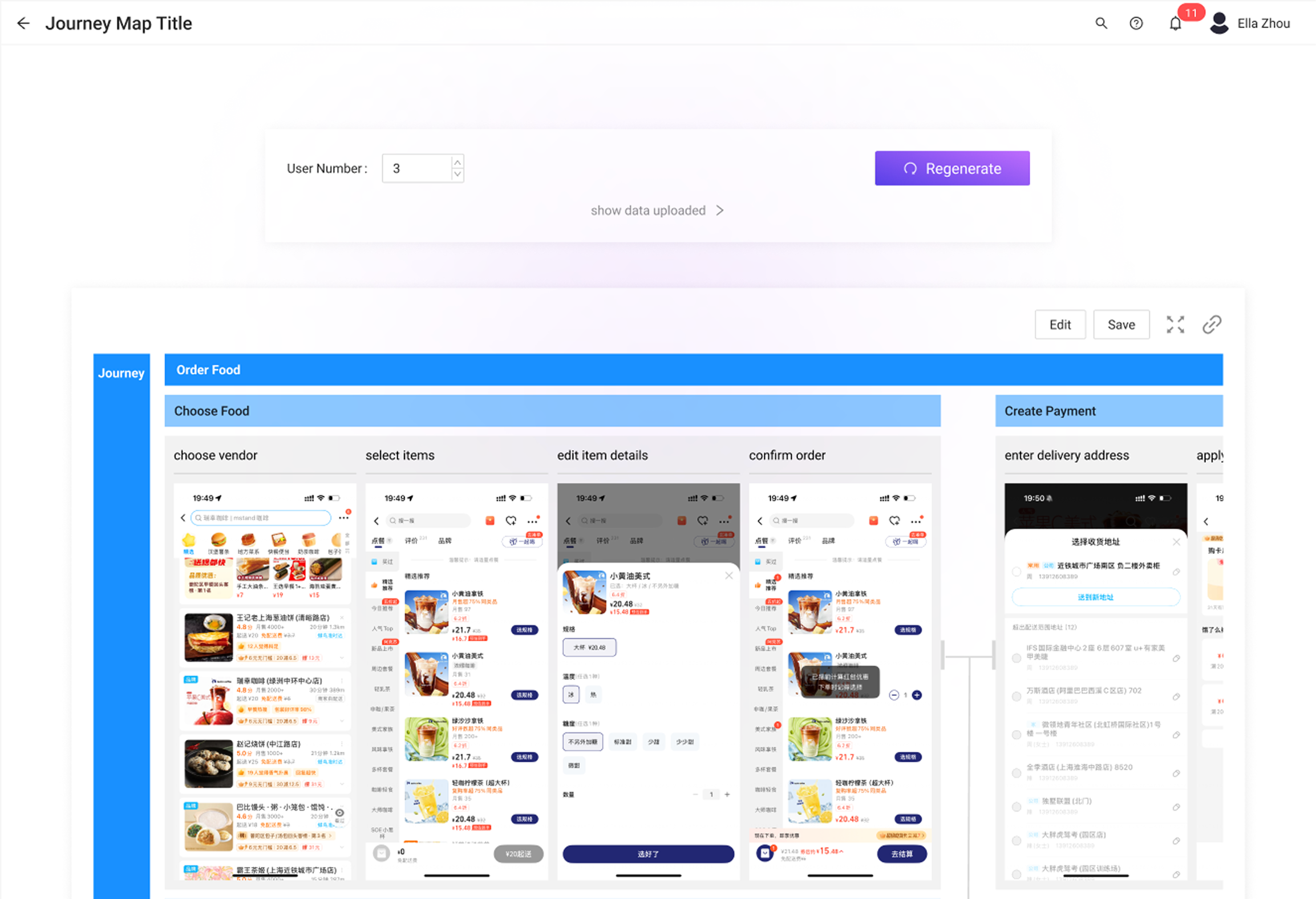
Automate journey map creation with consistency and high-quality insights
Part 1 — Automate data collection
INITIal proposal
Create a company-specific desktop plugin that integrates an internal auto-screenshot tool to automatically capture user behaviors, alongside a system that records raw user data at the system, browser, and page levels.
problems

Time-consuming
Resource-intensive
Redundant effort
Current method
Leverage open-source screenshot tools and the internal Analytics & Event Management (AEM) system to capture user data—including images and behavior data—at both browser and page levels.
pros
Time-saving
Easy to test
Resource-efficient
Future blueprint
Replace the open-source screenshot tool with an internally developed one, improving AEM system to add the capture of raw data at both system and real-life levels.
improvements

Data safety

Targeted features
Part 2 — Automate User Flow Generation
01. Rapid AI Automation Prototyping
Leverage frontier AI tools for quick prototyping
Used Alibaba’s internal AI workflow tools to prototype the AI-driven user flow.
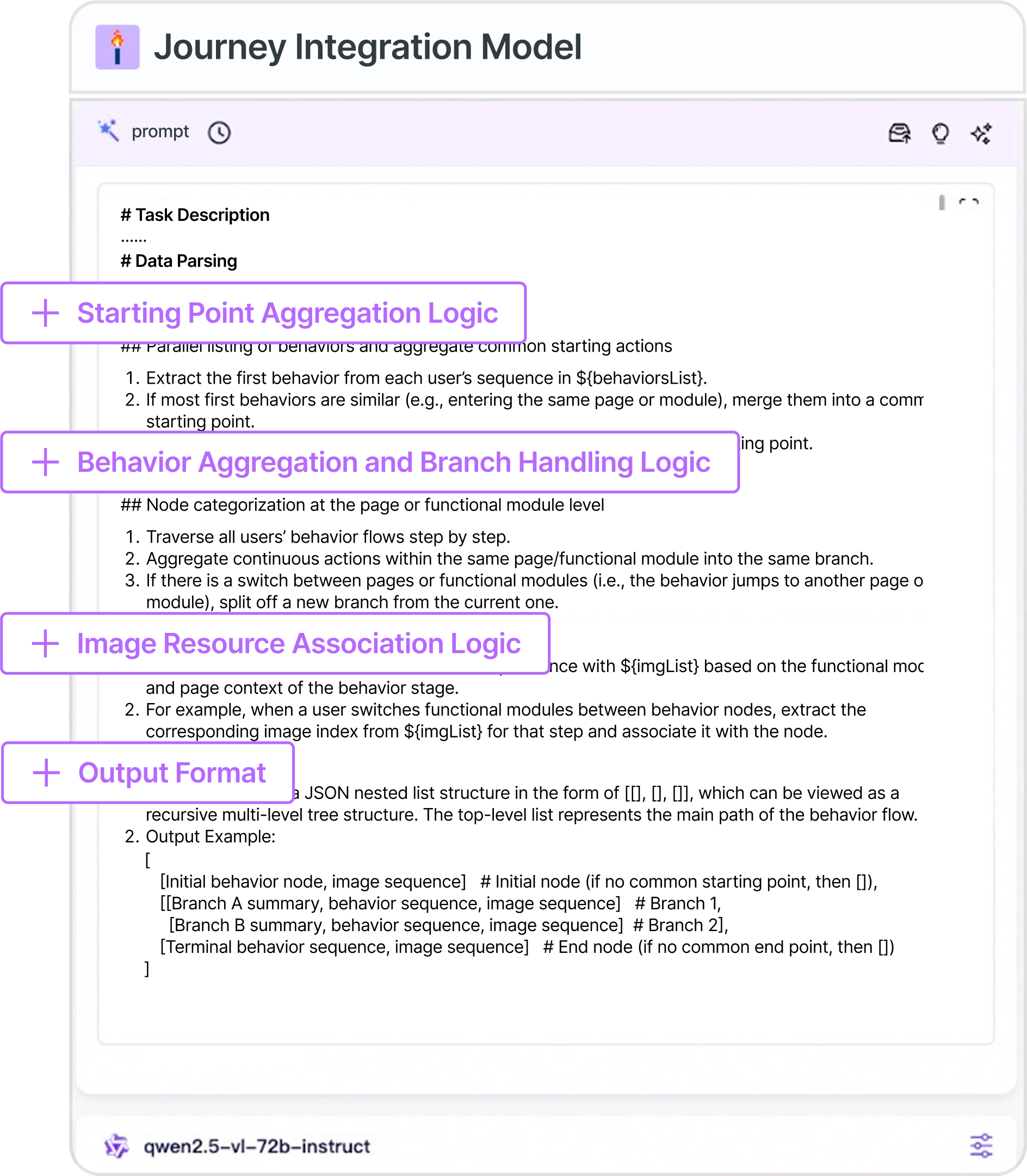
design thinking into AI improvement
AI tool improvement process
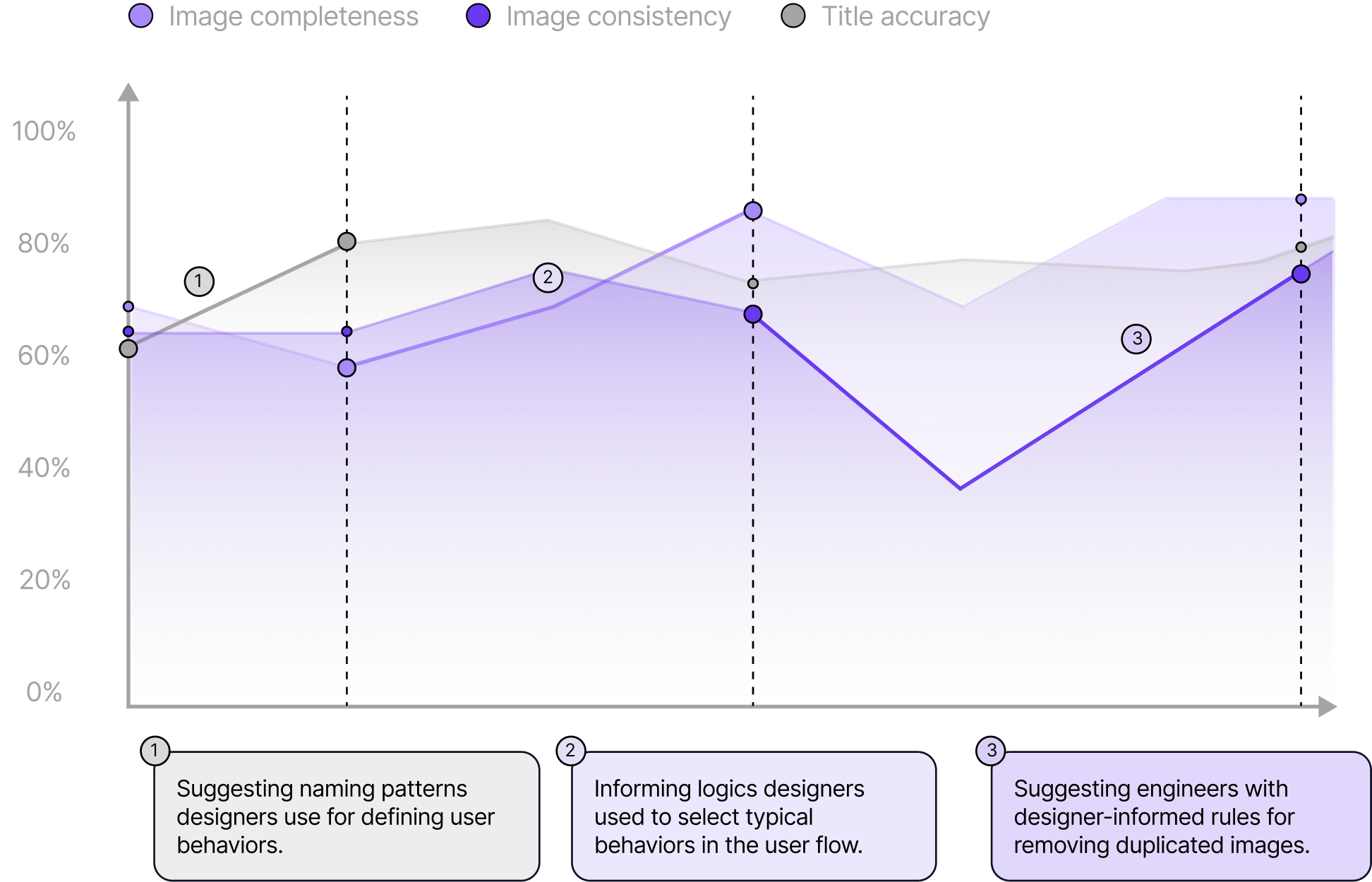
Desired standards
90%
Image Consistency
80%
Image Completeness
70%
Title Accuracy
Final performance
> 85%
Image Consistency
> 90%
Image Completeness
> 80%
Title Accuracy
01. User Interface Prototyping
feedback loops for AI generation
Additional Contribution
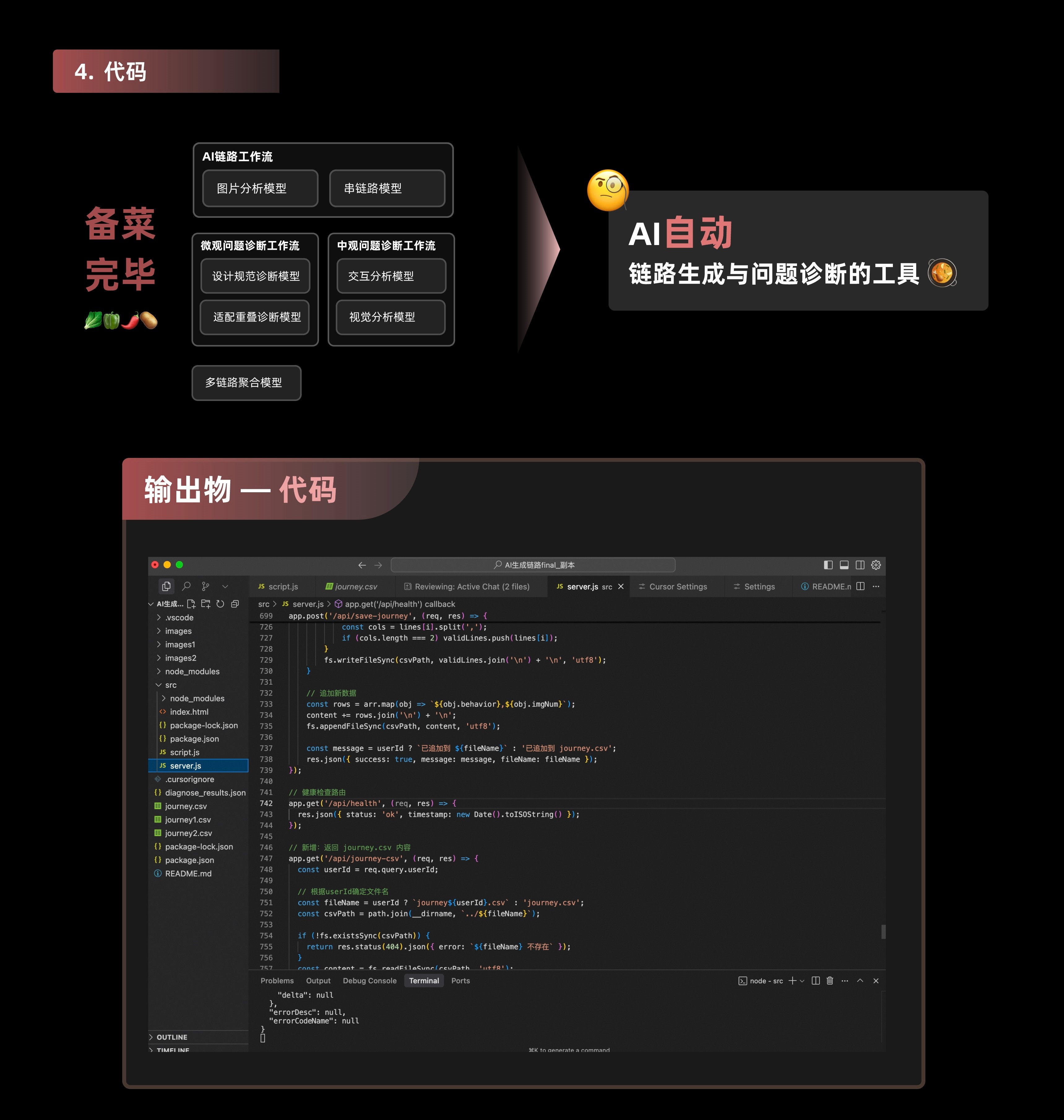
1. Vibe Coding
Integrate AI workflows and ML models, allow user input via the UI, and visualize the output on the front-end
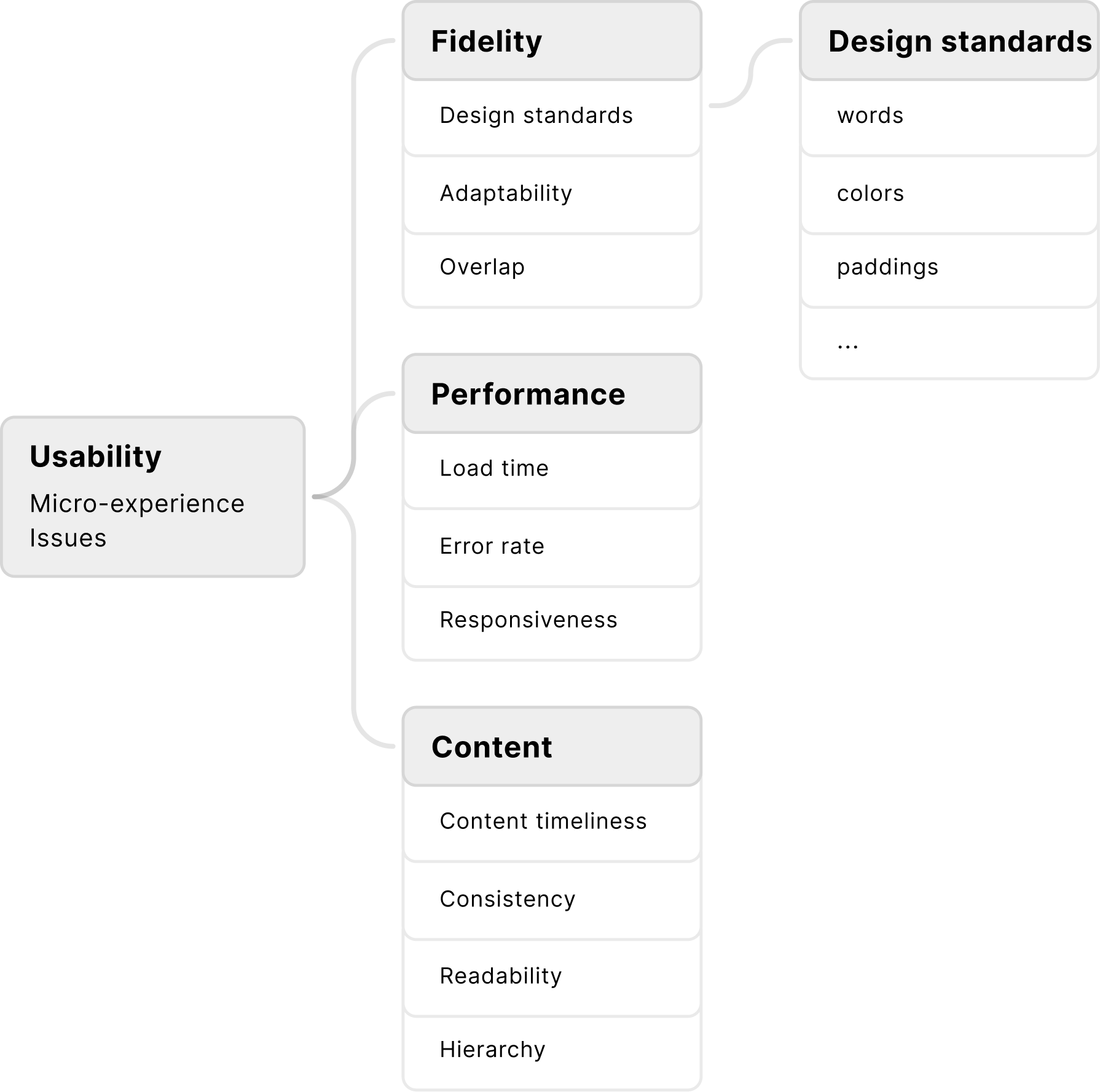
2. AI Problem Analysis
Use AI to connect insights across the user journey and help designers identify problems and opportunities more efficiently



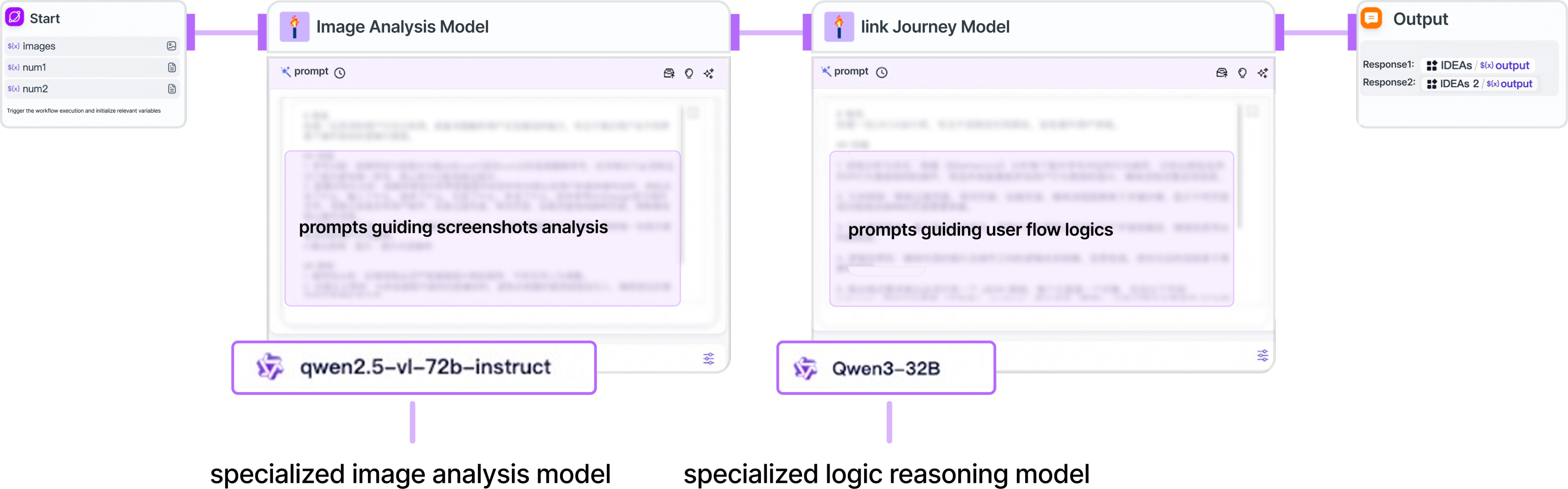
AI single-journey workflow
Image Analysis Model
Model for linking journeys

Model for integrating journeys


User behavior data

Code

AI workflows & models
User input via the UI, store user input
Journey visualization on the frontend
Call model API
Call model API
Save model output


vibe coding

AI problem analysis
standards
Reflection
How can the designer lead the rapid design of a brand-new AI tool, improving design speed, quality, and overall impact of the design?
Frontier AI tools enable designers to move faster than ever in building end-to-end AI-powered products. Yet the designer’s role becomes even more critical—leading how AI responds to user intentions, needs, and context.
How has my perspective on the UX role evolved?
During this internship, my perspective on the UX role evolved from focusing solely on wireframes and interaction flows in Figma to also implementing UI through AI-assisted development. Although AI significantly increased design speed, I realized that strong design judgment is still essential to guide AI toward meaningful, user-centered outcomes.
© 2025 Ella Zhou


Ella Zhou
Project
Resume
Contact

AI-driven User Flow Generation Tool
B2B Internal Tool / AI Product Design / End-To-End Prototyping
2025 Summer
An AI-driven User Flow Generation Tool, helping product designers to improve journey generation accuracy to 85% and reducing journey creation and analysis time by 70%.
company
Taobao Flash Sale
Taobao Flash Sale supports Alibaba’s key local services ecosystem. It provides instant food delivery and last-mile logistics within cities, serving millions of users every day.

Team
AI Design Team (Under Logistics System Design Team)
1 Sn. Design Team Lead, 2 Technical Consultants, Ella
Design tools and platforms to enhance designer’s working efficiency.
Importance of User Flows

On average, Alibaba’s designers spend 2 - 4 weeks creating journey maps to reconstruct behavior paths and identify issues. Despite the significant time and resources required, user flow remains one of the most critical steps before decision-making and design output.
Research
📝
To understand Alibaba’s user flow creation process, I spent a full week participating in every stage, from on-site user behavior documentation to flow mapping and problem analysis.
On-site behavior documentation
Manually collecting behavior images often results in blurry shots and distorted angles.
May interfere with user behavior.
User Flow Mapping
Organizing and analyzing on-site user behavior images can be overly time-consuming and tedious.
Designers follow Inconsistent mapping patterns.
Engineers could hardly understand user flows created in design tools.
Problem
At Alibaba, the effectiveness of user flows is hindered by inefficient on-site user behavior documentation and inconsistent and time-consuming practices, making it difficult for designers to generate quick insights to guide design decisions.
Solution
Create an end-to-end AI-driven user flow generation tool that:

Automate user behavior documentation process.
Automate user flow generation with consistency and high-quality.
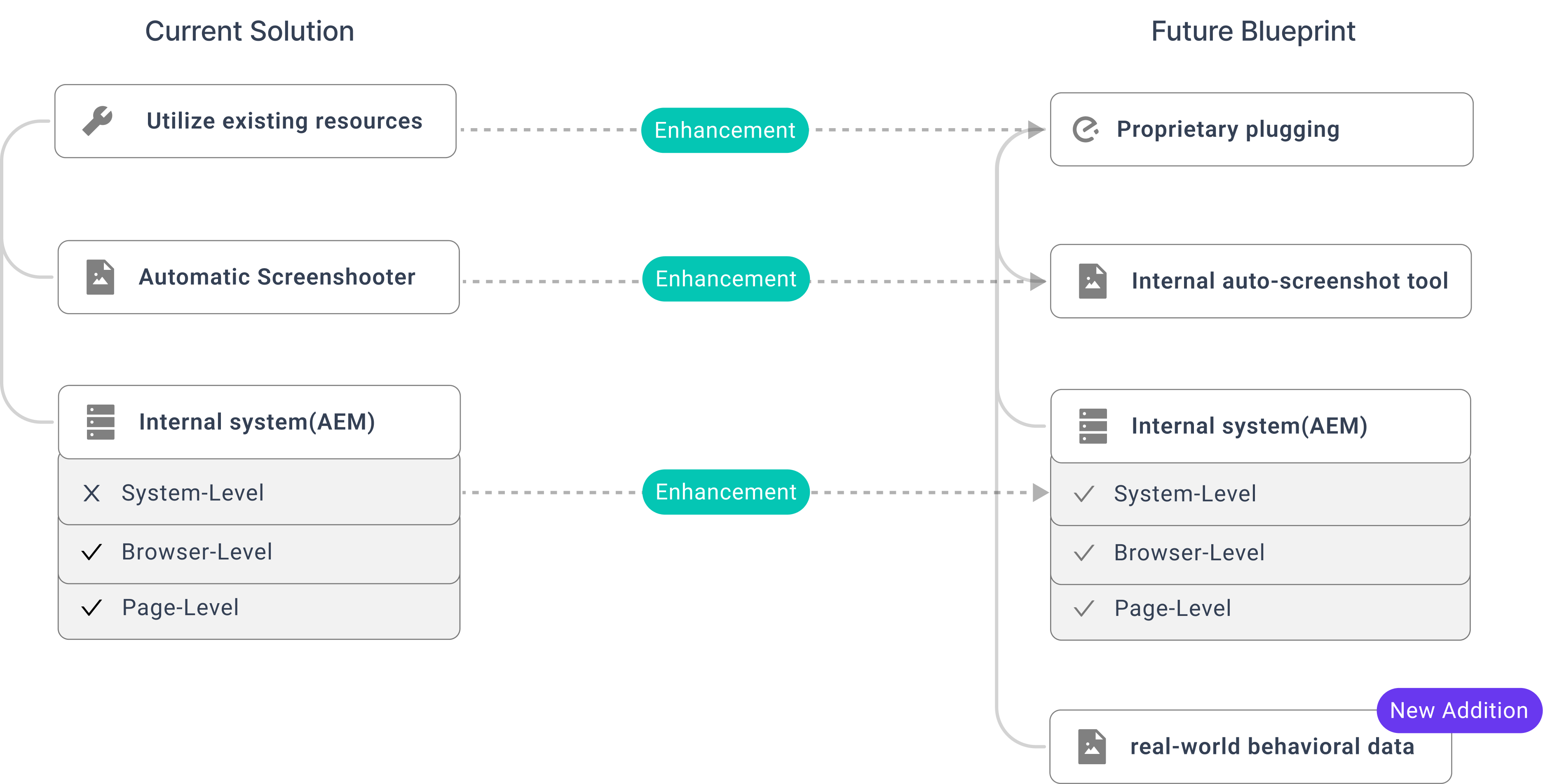
Part 1 — Automate data collection
INITIal proposal
Create a company-specific desktop plugin that integrates an internal auto-screenshot tool to automatically capture user behaviors, alongside a system that records raw user data at the system, browser, and page levels.
problems
Time-consuming
Resource-intensive
Redundancy-prone
Current method
Leverage open-source screenshot tools and the internal Analytics & Event Management (AEM) system to capture user data—including images and behavior data—at both browser and page levels.
pros
Time-saving
Easy to test
Resource-efficient
Future blueprint
Replace the open-source screenshot tool with an internally developed one, improving AEM system to allow the capturing of raw data at both system and real-life levels.
improvements
Better data safety
Targeted features
Part 2 — Automate User Flow Generation
01. Rapid AI Automation Prototyping
🤔
How can I, as a designer, lead the rapid design of a brand-new AI tool, improving design speed, quality, and overall impact of the design?
Leverage frontier AI tools for quick prototyping
Used Alibaba’s internal AI workflow tools to prototype the AI-driven user flow.
design thinking into AI improvement
AI tool improvement process
Desired standards
90%
Image Consistency
80%
Image Completeness
70%
Title Accuracy
Final performance
> 85%
Image Consistency
> 90%
Image Completeness
> 80%
Title Accuracy
02. User Interface Prototyping
🤔
Frontier AI tools help ensure the quality of AI-generated user flows. To support designers, both the AI generation process and its outcomes should be visualized in a clear and actionable way.
feedback loops for AI generation
User Flow visualization
Designers frequently reference behavioral phases during user flow analysis, so I designed them to aligned with the corresponding behavior screenshots.
Problem analysis
Add problem analysis
Add problem analysis card
Analyze problems and coordinate engineers
More Contribution
1.
Vibe Coding
Integrated AI workflows and ML models, allowed user input via the UI, and visualized the output on the front-end.
2.
AI-driven Problem Analysis
Used AI to connect insights across the user flows and helped designers identify problems and opportunities more efficiently.
01. Vibe Coding


AI single-journey workflow
Image Analysis Model
Model for linking journeys

Model for integrating journeys


User behavior data

Code

AI workflows & models
User input via the UI, store user input
Journey visualization on the frontend
Call model API
Call model API
Save model output



02. AI PROBLEM ANALYSIS
🤔
Designers can manually add problem analysis to the generated user flow. Can AI also perform automatic problem analysis?
Define Problem-Analysis Dimensions
Reflection
How can the designer lead the rapid design of a brand-new AI tool, improving design speed, quality, and overall impact of the design?
Frontier AI tools enable designers to move faster than ever in building end-to-end AI-powered products. Yet the designer’s role becomes even more critical—leading how AI responds to user intentions, needs, and context.
How has my perspective on the UX role evolved?
During this internship, my perspective on the UX role evolved from focusing solely on wireframes and interaction flows in Figma to also implementing UI through AI-assisted development. Although AI significantly increased design speed, I realized that strong design judgment is still essential to guide AI toward meaningful, user-centered outcomes.
© 2025 Ella Zhou


Importance
Research
Problem
Solution
More Contribution
Reflection